Filling the same form thirty times
How a saved profile and repeatable field mappings turn a stack of forms into a short review queue.
The first copy of a form is rarely the problem. You read each label, find the source record, type carefully, and check the result. The cost appears when the same form arrives for twenty-nine more people, matters, vendors, or applications.
At that point the work is not difficult, but it is expensive in attention. Every row asks you to move between a source and a destination. Similar labels use different wording. Dates change format. A field near the bottom of page four is easy to miss. The final copy often receives the least careful review because the operator has already seen the page too many times.
Start with a reusable profile
Fillauto separates reusable details from the document. A profile item has a known key, a value, a sensitivity level, and optional label aliases. “Organisation,” “Employer,” and “Company name” can all point to the same saved detail without changing the source value.
Profile values are encrypted in browser storage. They are not embedded in a document template and are not uploaded to a shared workspace. This is useful when the form is sensitive or when the person doing the work is not allowed to create another cloud copy.
The profile also gives you one place to correct a repeated detail. If an office address changes, you update the profile rather than hunting through a collection of copied templates.
Let the form explain its blanks
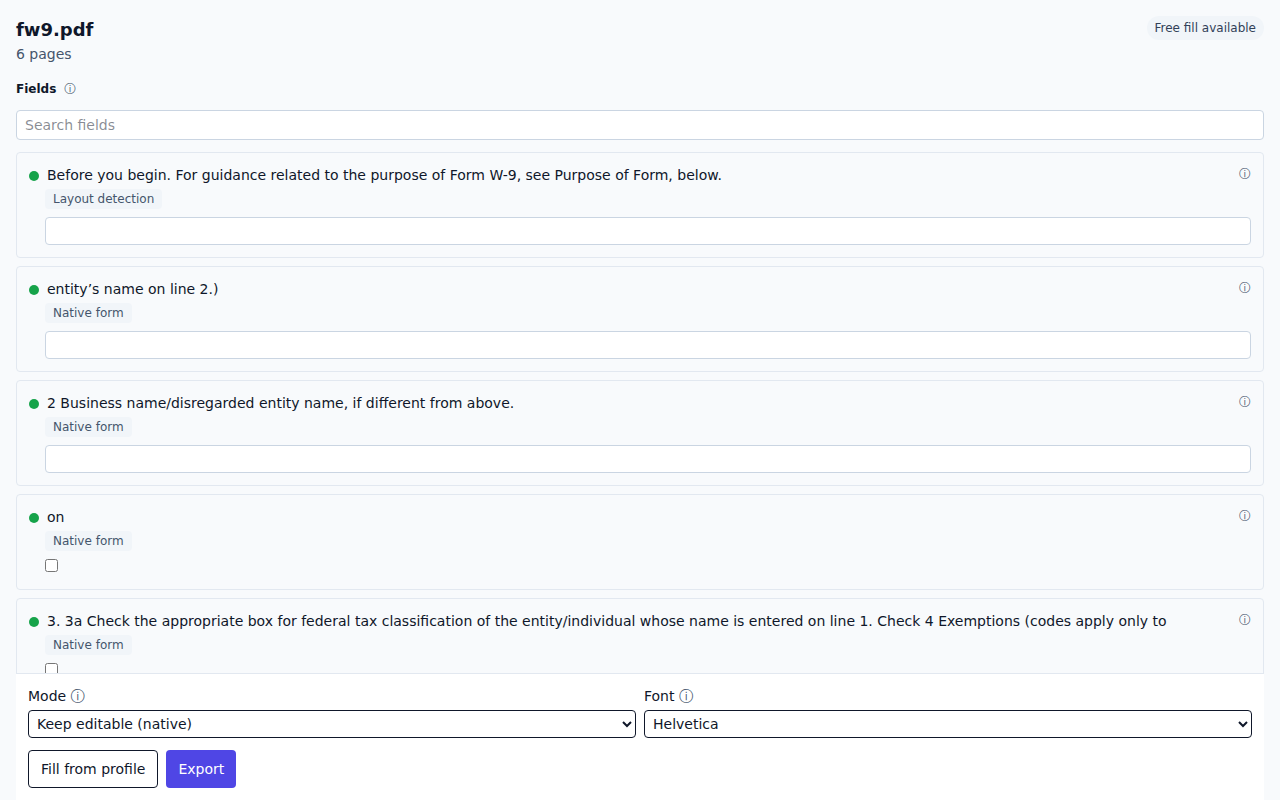
When you open a form, Fillauto first checks for native PDF fields. If the file is flat, the local engine looks at labels, blank lines, boxes, and table geometry. The result is a list of fields beside the document, in reading order.
That list is a real web form. Browser autofill and password managers can understand standard names such as email, telephone, address, and postal code. Fillauto can also match the list against its encrypted profile. Either way, the proposed values remain visible before export.
Confidence indicators are deliberately modest. A green field means the structure and label produced a stronger match. Amber asks for review. Nothing is written to the output just because a guess exists. You can change a value, reject a field, or create one the document layout did not reveal.
Keep the mapping, not the answers
Repeated forms become faster when the document family is recognised. A template can remember that a particular blank maps to a profile key. It does not need to store the answer. The next copy gets the same mapping and retrieves the current value from the profile.
That distinction helps with HR and legal work. A personnel form can reuse the shape of the form without carrying one employee’s information into the next file. A court filing can preserve where a matter number belongs without turning the template into a case record.
Review the exceptions
The sensible goal is not to remove review. It is to spend review time on the fields that differ. Start with the amber matches, scan the values that came from the profile, and use the document preview to verify position and fit. Keyboard navigation moves through the field list in order, so the check does not require repeated switching between mouse and keyboard.
At export, choose an editable PDF when another person needs to make changes, or a flattened copy when the text should become part of the page. The new file includes provenance metadata but no hidden copy of the filled values.
Measure the saved attention
For thirty forms, compare three numbers: the time to find each source value, the time to type it, and the time to check it. A saved profile removes most of the first two. A remembered mapping removes repeated label interpretation. The check remains because the person sending the form should stay responsible for it.
That is the practical promise of Fillauto. It does not turn forms into a new system of record. It shortens the mechanical middle of the job while keeping the documents, source details, and final decision on your computer.